


Let Me Cook.
Picture this. You’re cooking your famous chilli for your best friend. You’ve pulled out the ingredients, you know the recipe by heart, and you’re ready to go. Now imagine a helpful stranger walks into your kitchen, looks around, and just... starts doing things. They preheat the oven, and they dice your onions . Great, that’s helpful! But then they start mixing in their own spices, they decide to use ground turkey instead of beef, and they substitute kidney beans for pinto beans.
Sure, the chilli will be made, but it doesn’t feel like yours anymore.
This is what bad AI design feels like. Not because the AI made bad choices, but because it made choices that it wasn’t supposed to make. And as designers building AI-powered products, this is one of the most consequential decisions we face: not what the AI does, but what it should be allowed to do on its own.
Automation Should Be a Spectrum
The instinct in most AI product teams is to frame automation as binary. Either the AI does it, or the user does. But that’s not how it works in practice, and designing as if it were leads to products that can be frustrating and sometimes even dangerous.
Automation is a spectrum. Researchers have known this since 1978, when Thomas Sheridan and William Verplank at MIT published what became the foundational framework for human-machine interaction: a scale from full human control to full computer autonomy, with meaningful gradations in between. It was built for undersea robotics and aviation. The principles apply just as well to AI product design.
On one end of the spectrum, the AI suggests, it offers recommendations and waits. Think of the Smart Compose feature in Gmail, when you type something, it suggests a sentence; you can press tab to accept the suggestion or simply keep typing to ignore it. On the other end of the spectrum, the AI acts autonomously, silently, and without asking. The interesting design decisions don’t live at either extreme, but somewhere in the middle.
The first is how. How should the AI approach the task? What tone, what format, what level of confidence should it project? These are questions of execution, and they’re the ones most product teams spend their time on.
The second is if. Should the AI complete this task at all? And if so, in what way, and at what point does it stop and hand back control? These are harder questions, and more consequential ones. A feature that answers how beautifully but gets if wrong can still cause real harm; it can send the email you didn’t mean to send, make the edit you wanted to review first, or take the action you weren’t ready for.
At the very heart of this is the real trade-off that designers need to make when it comes to designing for AI automation: Speed vs Responsibility.
The Trade-Off
Every step toward more automation is a step toward faster outcomes and reduced user accountability. Every step toward more control is a step toward slower outcomes and higher user ownership. This is the fundamental trade-off across every AI feature. The question designers need to answer is where on that spectrum any given feature should sit, and why.
The research bears this out. A 2014 meta-analysis of automation studies found that while higher automation reliably improves routine performance and reduces workload, it creates a serious problem when things go wrong: users who’ve been out of the loop struggle to take back control precisely when it matters most. Psychologists call this the “out-of-the-loop” phenomenon. The faster the AI has been operating, the harder the handoff back to the human. A product that automates completely is implicitly saying: we own the outcome. A product that keeps the human in control is saying: you do. Most AI features sit somewhere in the middle, which means designers need to be honest about how much responsibility they’re quietly shifting away from the user and whether that shift is appropriate for what’s at stake.
And what’s at stake depends on two things: who’s using it, and what they’re doing with it.
Novices Want Speed, Experts Want Control
The right position on the automation dial isn't the same for everyone. It can change depending on the user’s skill level, goals, and responsibilities.
Novice users tend to want more automation. They’re trying to close a gap between what they know and what they need to produce. An AI that fills in, simplifies, and handles the hard parts feels genuinely useful. The cognitive cost of manual control — understanding the options, making the call, taking responsibility for the outcome — is a cost they’d rather not pay yet. Automation lowers the floor and gets them to a result.
Expert users tend to want less. They already know how to do the thing. What they want is to do it faster, with less friction. The moment an AI overrides their judgment, produces output they didn’t sanction, or makes a decision they would have made differently, it creates frustration. It’s in the way. Experts have what psychologists call a strong internal locus of control: a deep sense of agency over their work. Automation that bypasses them doesn’t feel like a shortcut.
This has a practical implication that most AI products ignore: the optimal place in the spectrum of control is a moving target. A useful design pattern is to start new users with higher automation defaults and progressively surface manual controls as they grow in confidence. Let the product earn the trust and right to automate. Provide users with the ability to control their level of automation during onboarding, so novices and experts can start exactly where they want.
High Stakes Always Mean High Control
When the outcome of an AI action is consequential: medically, financially, or legally, these are the situations where the human in the loop is a design requirement.
There’s a well-documented cognitive phenomenon called automation bias: our tendency to over-trust automated systems, even when we have information that contradicts them. The more confident an AI appears, the more likely users are to defer to it uncritically. In low-stakes contexts, this is tolerable. In high-stakes ones, it can be catastrophic.
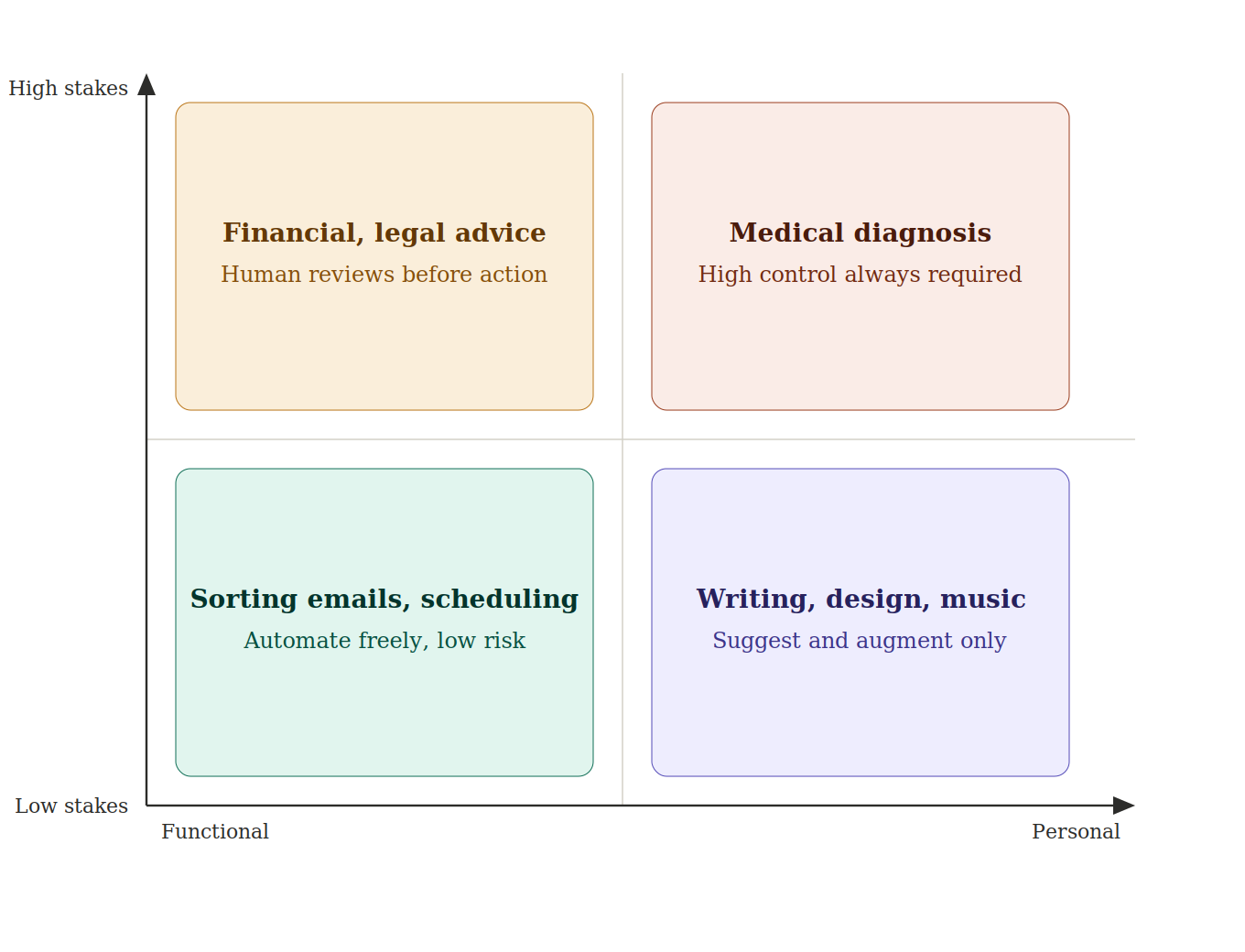
Consider AI diagnostic tools in healthcare. These systems can analyse imaging, flag anomalies, and identify patterns a human eye might miss. These tools can be extremely useful and valuable. But a radiologist who accepts an AI’s recommendation without scrutiny has abdicated judgment, and the AI cannot bear that responsibility in their place. These functional high-stakes AI have a defining characteristic: the output is factual, verifiable, and the error has a clear victim. In these types of applications, transparency and override control are absolutely essential because a single error can cost someone their health, money, or freedom. The AI’s job in these cases is not to make decisions, but to provide accurate information to inform the decision.
High-stakes creative or personal AI (writing a eulogy, designing a brand identity, producing music for release) is different in a subtler way. There’s no objectively right answer. If an AI writes your eulogy for you, it might be a perfectly good eulogy. but it isn’t yours. The emotional weight of that piece comes from the fact that you found those words. Automate it, and you’ve solved the wrong problem. The design implication here is about augmentation over generation. The AI should sharpen your thinking, surface possibilities, remove friction, not produce the finished thing. Control matters here not because mistakes are dangerous, but because the process is the point.
The Essential Feature: Undo
Wherever your product sits on the control spectrum, one principle is non-negotiable: users must always be able to go back.
The more autonomous the AI, the more essential undo becomes. It builds trust, encourages experimentation, and most importantly, provides a failsafe for when the AI gets it wrong. And it will get it wrong, because that’s how LLMs are by design.
Most AI tools today are powered by large language models, and LLMs are non-deterministic by design. This means if you run the same prompt twice, you’ll likely get two different responses. At its most benign, this produces useful variability. At its most disruptive, it produces what the industry calls hallucinations: outputs that are confident, fluent, and factually wrong. The model didn’t malfunction; it has no concept of right or wrong, only probability. It just landed on the wrong part of the distribution.
This is the thing that makes undo categorically different in AI products than in traditional software. A deterministic system makes predictable mistakes, the same bug triggers the same error, and you can design around it. A probabilistic system can fail in ways nobody anticipated, including the people who built it. If the AI can act, the user must be able to reverse it, cleanly, immediately, and without penalty for having trusted the system in the first place.
Good AI is a Great Sous Chef
The best sous chef in the world knows two things: how to cook, and when to stay out of the way. They prep, they assist, they catch things you’d miss. But when you’re plating the dish, they hand you the spoon.
AI works exactly the same way. The question isn’t how much can we automate, its how much does this person want automated, right now, for this specific task. And the honest answer to that varies by user, by task, by stakes, and by how much someone’s own judgment and voice are wrapped up in the outcome.
Design for the spectrum of control thoughtfully, default to augmentation over automation, and let users adjust their own level of trust. And always, always let them go back.